
Medication records
Keeping a migraine medication log
“When did I last take something?” is one of the hardest questions to answer during or after a migraine. A medication log answers it: a short record of what you took and when, kept alongside your migraine days. This page is about keeping that record. It doesn’t give advice on which medication to take, how much, or how often.
What to write down
- The time you took it. This is the part that is easiest to forget, and the hardest to work out later.
- What it was, when you can. A name is enough, and it can wait until you feel better.
- Whether it helped, if you want to note it: it helped, it partly helped, it didn’t help, the pain came back, or you had side effects.
- Whether it was during a migraine or on a day without one.
- Anything else your doctor or pharmacist has asked you to note.
If you only manage one thing, make it the time. Everything else can be added afterwards.
Count medication days as well as doses
There are two ways to count medication, and you may be asked for either:
- Doses: how many times you took something.
- Medication days: how many days you took anything at all. Three doses spread over two days are two medication days.
A log with dates and times gives you both. If you have been told to limit how often you take a medication, follow that advice. The log shows what you actually took, and your doctor or pharmacist can tell you what it means for you. How to count your migraine days covers the same day-counting rules for migraines and headaches.
Log it on days without a migraine, too
Medication taken for a headache, or at the first sign of something, belongs in the log even if the day never became a migraine. Otherwise your count comes out lower than what you actually took.
How the app keeps the log
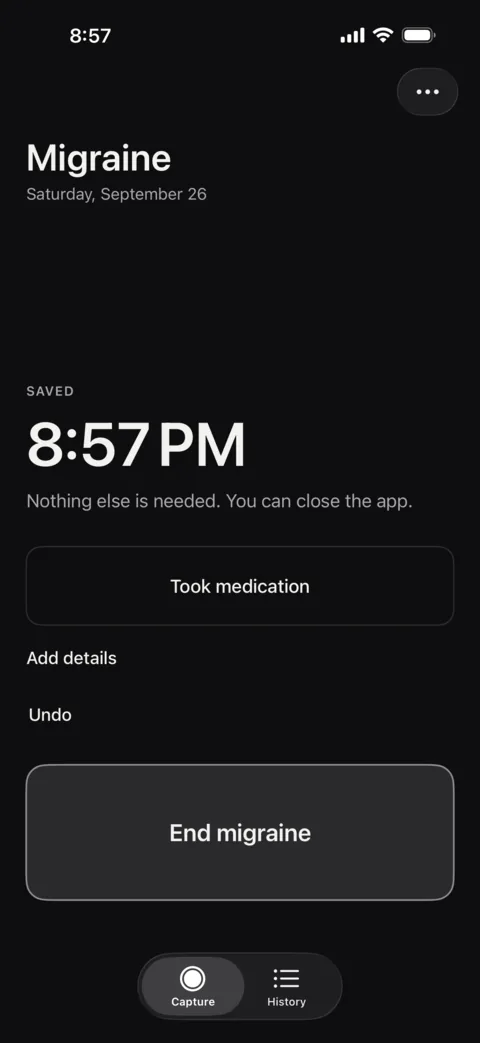
- During a migraine, tap Took medication. The time is saved and nothing else is asked.
- On any other day, tap Log medication on the Capture screen.
- While a migraine is active, the Home Screen widget has a Medication button.
- Add the name, and whether it helped, later.
In History, the Medication section shows how many medication logs you have in the last 30 days, with the dates that period covers, a count for each medication, and every entry by month. A dose logged on its own can be linked to a migraine later with Attach to a migraine. Your appointment summary includes the days with medication logged and a dated list of entries.
The app only counts. It never tells you whether a number is high or low, and it gives no dosing advice.
What this log doesn’t do
A medication log is a record, not guidance. It doesn’t tell you what to take, how much, how often, or which medications can be combined. For those questions, ask your pharmacist or doctor, and bring the log with you.
One tap now, the name later
Log medication in one tap during a migraine or on any other day, and see medication days and every entry in History. Free on iPhone, with no account.
This page is about keeping records. It isn’t medical advice and doesn’t replace advice from your doctor or pharmacist.