
Doctor and neurologist appointments
Preparing a migraine summary for your appointment
Appointments are short, and the questions are often about numbers: how many migraines, how long they last, what you took and whether it helped. Those are hard to answer from memory. A short summary of your migraine history, made from what you recorded, lets you answer them and spend the rest of the visit on your questions.
What to bring
- Your day counts for the last one to three months: migraine days, headache days and days you took medication. How to count your migraine days explains a simple way to keep them.
- How long your migraines usually last, if you recorded end times.
- The medication you used for migraines or headaches, how often you logged each one, and whether it helped. A medication log makes this part easy.
- Anything missing or uncertain, such as a week you didn’t record. It is more useful to say so than to guess.
- What has changed since your last visit, in your own words.
- Two or three questions you want answered, written down before you go.
What a headache diary is expected to cover
Your doctor may ask you to keep a diary for a set time. As one example, the UK’s NICE guideline on headaches in people over 12 says that when a headache diary is used to help with diagnosis, the person should record, for a minimum of 8 weeks:
“frequency, duration and severity of headaches; any associated symptoms; all prescribed and over the counter medications taken to relieve headaches; possible precipitants; relationship of headaches to menstruation.”
NICE guideline CG150, recommendation 1.1.4
You don’t need every item to start. Dates alone already give you a day count, and you can fill in more when you are able to. Follow whatever your own doctor asks you to record.
Keep it to one page
- Numbers first. Put the counts at the top, with the period they cover.
- Say how you counted. For example, whether a migraine that ran past midnight counted on both days.
- List what is missing. Missing end times or medication details are worth a line.
- Then the detail. A dated list of migraines and medication entries, most recent first, for anyone who wants to look closer.
- Bring the full record too, in case you are asked about a particular week.
An example summary
This is what a Migraine Tracker: Capture summary looks like. The layout and wording are the app’s own; the entries are made up.
Example · made-up entries
Migraine Tracker Summary
Migraine overview
- 6 migraines recorded
- 7 days with a migraine recorded
- 1 headache recorded
- 1 headache day
- Average recorded length: 3 hours 5 minutes (from 6 migraines with a recorded end time)
- Median recorded length: 3 hours 4 minutes
- Longest recorded length: 4 hours 20 minutes
Medication context
- 4 migraines included a medication entry
- 4 days with medication logged
- Sumatriptan: logged 3 times
- Ibuprofen: logged 1 time
How these numbers were counted
- A day with a migraine recorded is any calendar day a recorded migraine covered. One that ran past midnight counts on each day it covered, and two migraines on the same day count as one day.
- Days are counted in the time zone each migraine was recorded in.
- This record holds the periods that were marked as a migraine. It does not separately identify warning or recovery phases, so those are included only where they were recorded as part of a migraine.
- Headache days are counted separately and are not included in the days with a migraine recorded.
- A day with medication logged is any day carrying a medication entry, whether or not a migraine was recorded that day.
Missing information
- Medication information wasn’t recorded for 2 migraines.
- Severity wasn’t recorded for 4 migraines.
Medication entries (most recent first)
- Sep 26, 2026, 8:05 PM · Sumatriptan
- Sep 22, 2026, 9:10 PM · Sumatriptan
- Sep 12, 2026, 6:20 PM · Sumatriptan
- Sep 4, 2026, 7:30 AM · Ibuprofen
Timeline (most recent first)
- Sep 26, 2026, 7:46 PM · 1 hour 12 minutes · Sumatriptan
- Sep 22, 2026, 8:58 PM · 4 hours 20 minutes · Sumatriptan
- Sep 17, 2026, 11:30 PM · 2 hours 49 minutes
- Sep 15, 2026, 2:10 PM · 1 hour 30 minutes · logged as headache
- Sep 12, 2026, 6:00 PM · 3 hours 8 minutes · Sumatriptan
- Sep 4, 2026, 7:00 AM · 4 hours · Ibuprofen
- Aug 30, 2026, 9:00 AM · 3 hours
In this example, the migraine on September 17 ran past midnight, so it counts on September 17 and 18. That is why 6 migraines make 7 days with a migraine recorded.
How the app makes the summary
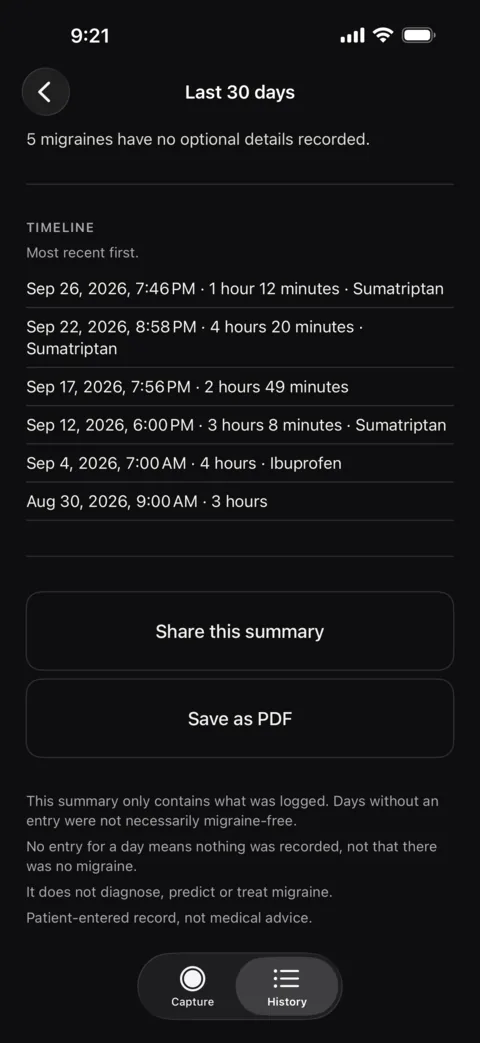
Everything in the summary comes from what you saved: migraines logged with one tap, any details you added later, and your medication entries.
- Open History.
- Under Summary, pick a period.
- Tap Share this summary to send it as text, or Save as PDF to print it or attach it to a message. The PDF uses Letter or A4 paper depending on your region.
The last 30 days summary is free. The last 90 days, this month, the previous month and a custom range come with Lifetime, an optional one-time purchase. There is no subscription.
What the summary is, and isn’t
The summary is a plain record of what you logged, with the counts worked out for you and the gaps stated. It is not a medical report. It doesn’t diagnose, predict or treat migraine, and it doesn’t tell you or your doctor what the numbers mean. Your doctor decides what is relevant.
Have the summary ready before you need it
Save a migraine in one tap now and add the details later. When an appointment comes up, the summary is already there. Free on iPhone, with no account.
This page is about organising your own records. It isn’t medical advice. For questions about your headaches or your treatment, talk to a qualified healthcare professional.